Travel often reminds you how dependent you are on a stable internet connection. While everything feels seamless with full bars, when you land in a new country, head into the mountains, or lose signal on a road trip, even basic tasks like finding your hotel or translating a menu become difficult.
Top 6 Offline Travel Apps You Should Download Before Your Next Trip
From Google Maps to AllTrails, these offline travel apps help you navigate, translate, and stay safe without an internet connection

Advertisement
That is why experienced travellers always have a few offline apps downloaded on their phones before they leave home. These apps continue to work even without mobile data, helping you navigate unfamiliar cities, learn foreign languages, make reservations, convert currencies, and stay safe in remote areas. Whether you are exploring a busy European capital, bargaining in a local market, or hiking deep into the wilderness, having the right apps downloaded in advance can make all the difference.
Here are six of the best offline travel apps worth installing before your next journey.
6 Offline Travel Apps To Download For Your Next Trip
Google Maps (Offline Mode)

Google Maps remains one of the most reliable tools for offline navigation worldwide Shutterstock
Google Maps remains one of the most essential tools for any traveller, and its offline mode is especially useful when you know you may not have consistent internet access. Before your trip, you can download specific regions directly to your phone, with file sizes ranging from around 50MB for smaller cities to 2GB for large areas. Once saved, you can search for places, access turn-by-turn driving directions, and locate previously saved restaurants and attractions without using any data.
Advertisement
This feature proves particularly valuable for road trips and in remote regions where mobile networks are unreliable. While offline maps do not offer real-time traffic information, transit schedules, or full walking directions, they still let you find your accommodation or navigate unfamiliar roads. For this reason, Google Maps remains one of the most dependable offline tools you can carry.
Google Translate

Google Translate helps travellers understand menus, signs, and labels even without an internet connection Shutterstock
Travelling to a place where you do not speak the language? Google Translate is a must-have app in such a scenario. It allows you to download offline language packs, each typically requiring around 30MB to 50MB of storage. Once installed, you can type text or use your camera to translate menus, signs, labels, and other written content in real time, even with no internet connection.
It is one of the most practical tools for everyday travel situations, from ordering food to understanding supermarket packaging. Although voice-to-voice conversation translation usually requires an internet connection, the offline text and camera features still cover many travel needs effectively.
Advertisement
MAPS.ME

MAPS.ME offers detailed offline maps ideal for city exploration and remote adventures Shutterstock
MAPS.ME is a favourite among backpackers and independent travellers. Built using OpenStreetMap data, the app compresses maps efficiently to save storage while still offering an impressive level of detail. You will find walking trails, cycling routes, subway stations, public benches, viewpoints, and many other useful points of interest.
The app supports walking, cycling, and driving directions worldwide, making it particularly useful for city walking tours and off-the-beaten-path adventures. On older smartphones, map rendering may occasionally feel slower, but the level of detail more than makes up for it. If you enjoy exploring hidden alleys, scenic hiking routes, or lesser-known neighbourhoods, MAPS.ME is an excellent companion.
TripIt

A smartphone becomes an essential travel companion when exploring unfamiliar destinations Shutterstock
Keeping all your travel details in one organised place can be a hassle, especially when you have a lot of them. But TripIt helps you do exactly that without any internet access. The app can automatically scan confirmation emails and build a complete itinerary containing flight schedules, hotel bookings, train tickets, and rental car reservations. Because this information is primarily text-based, it requires very little storage and remains available offline on your device.
Advertisement
This makes TripIt especially useful when you need quick access to booking references at airport check-in counters, immigration desks, or hotel receptions. Features such as live flight alerts, gate changes, and delay notifications do require an internet connection, but the core itinerary remains accessible anywhere.
XE Currency
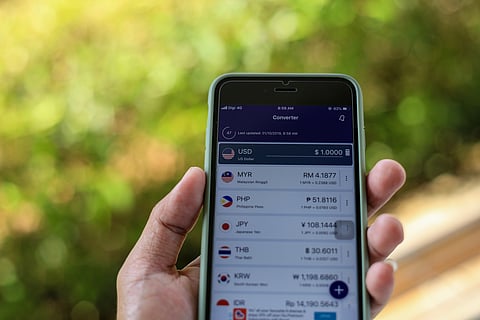
XE Currency allows travellers to convert prices offline using saved exchange rates Shutterstock
XE Currency is one of the most trusted currency converters for international travel. The app stores exchange rates for up to 100 currencies while using minimal storage space. Once rates are synced, you can continue converting prices offline using the most recent data downloaded.
This is particularly helpful when shopping in local markets, comparing hotel prices, or checking restaurant bills in unfamiliar currencies. Since the app relies on the last synced exchange rate, it will not reflect real-time market fluctuations until you reconnect to the internet. Even so, it provides a reliable estimate and helps you make quick financial decisions without needing mobile data.
Advertisement
AllTrails

AllTrails helps hikers navigate trails safely without relying on cellular signal Shutterstock
For hikers, mountain bikers, and outdoor enthusiasts, AllTrails is one of the best apps to have on your phone. It allows users to download trail maps that generally range from 20 MB to 100 MB, depending on the route. Once saved, these maps use your phone's GPS to track your location and monitor your progress, even in areas with no cellular signal.
This can be an important safety feature when exploring unfamiliar terrain or venturing into backcountry areas. One limitation is that offline map downloads require the paid AllTrails+ subscription. For anyone planning to spend time on hiking trails, however, the ability to navigate confidently without a signal makes it well worth considering.
FAQs
1. What are the best offline travel apps?
Some of the most useful offline travel apps include Google Maps, Google Translate, MAPS.ME, TripIt, XE Currency, and AllTrails.
2. Can Google Maps work without internet?
Yes. You can download specific regions in advance and use them offline for navigation and place searches.
Advertisement
3. Does Google Translate work offline?
Yes. Download language packs to translate text and use the camera to interpret menus, signs, and labels without internet access.
4. Which app is best for offline hiking maps?
AllTrails is one of the most reliable hiking apps and allows offline trail downloads through its paid subscription.
5. How can I access my itinerary without internet?
TripIt stores all your travel reservations and booking confirmations offline, making them accessible anytime.

Published At: